Autodesk have released a corrected version of Update 2 for LT 2009. You must uninstall the old version (if you have it) before installing this one.
AutoCAD LT 2009 Update 2.01
Autodesk a publié une version corrigée du Update 2 pour AutoCAD Lt 2009. Vous devez désinstaller la vieille version (si vous l'avez) avant d'installer celle-ci.
Tuesday, November 11, 2008


Maurice Richard
I was browsing a blog dedicated to the Montreal Canadiens today and found this gem. How times have changed...
Maurice Richard's 1956-1957 Contract / Le contrat de Maurice Richard pour la saison 1956-1957
Je navigais un blog dédier aux Canadiens de Montréal ce matin et j'ai trouvé cet item. Le monde a changé...
Maurice Richard's 1956-1957 Contract / Le contrat de Maurice Richard pour la saison 1956-1957
Je navigais un blog dédier aux Canadiens de Montréal ce matin et j'ai trouvé cet item. Le monde a changé...
Monday, November 10, 2008
Firewood / Bois de chauffage
I recently spent a weekend as a lumberjack, chopping wood and singing the LumberJack Song. What a time!!! Anyway, the topic of discussion came up concerning how much we chopped. The official definition of a cord of wood is: a cord is defined as a pile of wood 8' long x 4' high by 4' deep for a total of 128 cubic feet or 3.624556 cubic meters. A cord of wood can be divided into 3 piles with a 16" depth which is the standard length of a piece of firewood and also known as a kitchen cord. It was a fun and exhausting experience to chop wood.
Récemment, j'ai passé un weekend à buché du bois de feu et à chanté "The LumberJack Song". Quel temps!!! Anyway, la discussion a tourné vers la quantité de bois que nous avons buché. La définition officielle d'une corde de bois est ceci: une corde de bois est défini comme étant une pile 8' de long, 4' de haut et 4' de profond pour un total de 128 pieds cubiques ou 3.624556 mètres cubiques. Une corde peut être divisé en trois parties avec une profondeur de 16" qui est la longueur officielle d'un morceau de bois de feu.
Récemment, j'ai passé un weekend à buché du bois de feu et à chanté "The LumberJack Song". Quel temps!!! Anyway, la discussion a tourné vers la quantité de bois que nous avons buché. La définition officielle d'une corde de bois est ceci: une corde de bois est défini comme étant une pile 8' de long, 4' de haut et 4' de profond pour un total de 128 pieds cubiques ou 3.624556 mètres cubiques. Une corde peut être divisé en trois parties avec une profondeur de 16" qui est la longueur officielle d'un morceau de bois de feu.
Friday, November 07, 2008
AutoCAD LT + Express Tools
I got a call from a client asking if he could get the Express Tools for AutoCAD LT 2009. I has to tell him that these tools do not exist for LT pour only for AutoCAD and the vertical solutions. However, you can use the Layer Tools from the Express Tools in all versions since 2007. Go to the Format menu and click on Layer Tools.
J'ai recu un appel d'un client demandant s'il pouvait obtenir les Express Tools pour AutoCAD LT 2009. Je lui ai dit que ces outils n'existent pas pour LT mais seulement pour AutoCAD et les solutions verticales. Mais, vous pouvez utiliser les Layer Tools provenant des Express Tools dans chaque version depuis 2007. Allez au menu Format et cliquez sur Layer Tools.
J'ai recu un appel d'un client demandant s'il pouvait obtenir les Express Tools pour AutoCAD LT 2009. Je lui ai dit que ces outils n'existent pas pour LT mais seulement pour AutoCAD et les solutions verticales. Mais, vous pouvez utiliser les Layer Tools provenant des Express Tools dans chaque version depuis 2007. Allez au menu Format et cliquez sur Layer Tools.
Monday, November 03, 2008
Autodesk + SoftImage
On October 23rd, it was announced that Autodesk was buying the SoftImage division from Avid Technology. SoftImage produces the XSI range of animation/rendering software, a direct competitor to 3dsmax. Is this a good thing for the industry? Two years ago, Autodesk bought Maya, a then competitor. I personally use Blender for my rendering/animation projects outside of Autodesk-related stuff. This announcement won't affect me but it is sure to annoy a great many people. To read more, click on the following link.
Autodesk buys SoftImage
Le 23 octobre dernier, Autodesk a annoncé qu'il achetait la division SoftImage de la société Avid Technology. SoftImage produit la gamme de produits de rendu/animation XSI, un competiteur directe à 3dsmax. Est-ce une bonne chose pour l'industrie? Il y a 2 ans, Autodesk a acheté Maya, un ancien compétiteur. Personallement, j'utilise Blender pour mes projets de rendu/animation à l'extérieur des projets reliés aux produits d'Autodesk. Cette annonce m'affecte pas mais va déranger beaucoup de personnes. Pour en lire plus, veuillez suivre le lien ci-dessus.
Autodesk buys SoftImage
Le 23 octobre dernier, Autodesk a annoncé qu'il achetait la division SoftImage de la société Avid Technology. SoftImage produit la gamme de produits de rendu/animation XSI, un competiteur directe à 3dsmax. Est-ce une bonne chose pour l'industrie? Il y a 2 ans, Autodesk a acheté Maya, un ancien compétiteur. Personallement, j'utilise Blender pour mes projets de rendu/animation à l'extérieur des projets reliés aux produits d'Autodesk. Cette annonce m'affecte pas mais va déranger beaucoup de personnes. Pour en lire plus, veuillez suivre le lien ci-dessus.
Friday, October 31, 2008
Happy Halloween
Happy Halloween to all! May your candy be safe and tasty!
Joyeux Halloween à tous! Je vous souhaites que vos bonbons soient sécuritaire et délicieux!
Joyeux Halloween à tous! Je vous souhaites que vos bonbons soient sécuritaire et délicieux!
2 Years of Blogging / 2 ans de Blog
Greetings!
This blog, which I am quite proud of, was founded 2 years ago. It's been fun and an interesting experience. My thanks to all the visitors that have read something interesting here.
Salutations!
Ce blog, donc je suis très fier, a été fondé il y a 2 ans. Ceci a été un plaisir et une expérience très intéressante. Mes sincères remerciements à tous les visiteurs qui ont lu quelque chose d'intéressant ici.
This blog, which I am quite proud of, was founded 2 years ago. It's been fun and an interesting experience. My thanks to all the visitors that have read something interesting here.
Salutations!
Ce blog, donc je suis très fier, a été fondé il y a 2 ans. Ceci a été un plaisir et une expérience très intéressante. Mes sincères remerciements à tous les visiteurs qui ont lu quelque chose d'intéressant ici.
Friday, October 24, 2008
Problem with/avec Update 2 for AutoCAD LT 2009
Hi!
I just learned that Update 2 for AutoCAD LT 2009 has been recalled and that you should uninstall it as soon as possible. There have been reports of crashes after its installation. Make sure you do have Update 1 installed instead.
Salut!
Je viens d'apprendre que Update 2 pour AutoCAD LT 2009 a été rappelé et que vous devriez désinstaller ce correctif le plus tot possible. Il y a eu des indications qu'AutoCAD LT crash après son installation. Assurez-vous que Update 1 est installé au lieu.
I just learned that Update 2 for AutoCAD LT 2009 has been recalled and that you should uninstall it as soon as possible. There have been reports of crashes after its installation. Make sure you do have Update 1 installed instead.
Salut!
Je viens d'apprendre que Update 2 pour AutoCAD LT 2009 a été rappelé et que vous devriez désinstaller ce correctif le plus tot possible. Il y a eu des indications qu'AutoCAD LT crash après son installation. Assurez-vous que Update 1 est installé au lieu.
Thursday, October 16, 2008
Design Review 2009 Problem
I ran into a problem when installing AutoCAD 2009 on a computer with AutoCAD 2007 on it. Design Review 2009 won't install for some reason. After a couple of tries, I got the following error message:
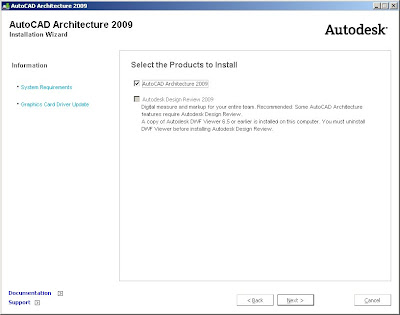
It would seem that old versions of DWF Viewer are incompatible with Design Review 2009. I recommend to everyone to uninstall DWF Viewer before installing Design Review 2009.
Don't forget SP1 for Design Review 2009.
J'ai rencontré un problème lors de l'installation d'AutoCAD 2009 sur un ordinateur avec AutoCAD 2007. Pour une raison quelconque, Design Review 2009 ne s'installe pas. Après quelques essais, j'ai eu le message ci-dessus. Il semble que les vielles versions de DWF Viewer sont incompatible avec Design Review 2009. Je recommande fortement de désinstaller DWF Viewer avant de commencer l'installation de Design Review 2009.
N'oublier pas SP1 pour Design Review 2009.

It would seem that old versions of DWF Viewer are incompatible with Design Review 2009. I recommend to everyone to uninstall DWF Viewer before installing Design Review 2009.
Don't forget SP1 for Design Review 2009.
J'ai rencontré un problème lors de l'installation d'AutoCAD 2009 sur un ordinateur avec AutoCAD 2007. Pour une raison quelconque, Design Review 2009 ne s'installe pas. Après quelques essais, j'ai eu le message ci-dessus. Il semble que les vielles versions de DWF Viewer sont incompatible avec Design Review 2009. Je recommande fortement de désinstaller DWF Viewer avant de commencer l'installation de Design Review 2009.
N'oublier pas SP1 pour Design Review 2009.
AutoCAD 2008 64-bit Network
I ran into a problem with a client who needed to create a network deployment for AutoCAD 2008 64-bit. We created a deployment on a 32-bit Windows Server 2003 and thus, according to the following link, creates a 32-bit deployment even if the DVD has both versions. To create a 64-bit deployment, it must be created on a 64-bit Windows (XP, Vista, Server). The 2009 version asks you what flavor you require in your deployment.
My thanks to Jean-Francois for reporting this problem to me.
AutoCAD 2008 64-bit
J'ai rencontré un problème avec un client qui avait besoin d'un déploiement réseau pour AutoCAD 2008 64-bit. Nou savons créé un déploiement sur un Windows Server 2003 32-bit et, d'après le lien ci-dessus, un déploiement 32-bit est créé même si le DVD contient les 2 versions. Pour créer un déploiement 64-bit, il faut le créer sur un Windows 64-bit (XP, Vista, Server). La version 2009 nous demande la saveur voulue dans la déploiement.
J'aimerais remercier Jean-Francois pour son reportage du problème.
My thanks to Jean-Francois for reporting this problem to me.
AutoCAD 2008 64-bit
J'ai rencontré un problème avec un client qui avait besoin d'un déploiement réseau pour AutoCAD 2008 64-bit. Nou savons créé un déploiement sur un Windows Server 2003 32-bit et, d'après le lien ci-dessus, un déploiement 32-bit est créé même si le DVD contient les 2 versions. Pour créer un déploiement 64-bit, il faut le créer sur un Windows 64-bit (XP, Vista, Server). La version 2009 nous demande la saveur voulue dans la déploiement.
J'aimerais remercier Jean-Francois pour son reportage du problème.
Wednesday, October 15, 2008
Autodesk Design Review
Hello again!
Please download Service Pack 1 for either Design Review, 2007, 2008 or 2009 from the following link. The service pack will ensure that your software is stable and performs correctly.
Autodesk Design Review SP1
Bonjour encore!!!
Veuillez télécharger Service Pack 1 pour soit Design Review 2007, 2008 ou 2009 à partir du lien ci-dessus. Le service pack assurera que votre logiciel est stable et fonctionne bien.
Please download Service Pack 1 for either Design Review, 2007, 2008 or 2009 from the following link. The service pack will ensure that your software is stable and performs correctly.
Autodesk Design Review SP1
Bonjour encore!!!
Veuillez télécharger Service Pack 1 pour soit Design Review 2007, 2008 ou 2009 à partir du lien ci-dessus. Le service pack assurera que votre logiciel est stable et fonctionne bien.
Wednesday, October 01, 2008
Reset your AutoCAD / Faire un reset de votre AutoCAD
I encountered the same problem on 2 computers this week. The right-click menus in AutoCAD no longer worked for the current user account but did work for the Administrator account. To correct the problem (high probability), follow these steps BEFORE reinstalling AutoCAD:
1- Make sure that the option to show hidden folders is on. If the Application Data folder is not visible, you must do this first.
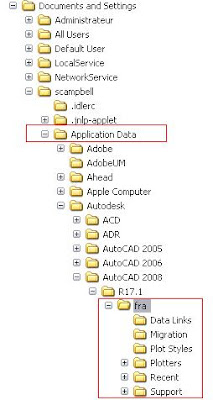 2- Back up the Documents and Settings folder for your AutoCAD version (the fra folder as shown). This folder will have an abbreviation for the AutoCAD language that is installed.
3- Erase the same folder from the computer.
4- Open Regedit and erase the folder shown below.
 5- Erase the AutoCAD folder appropriate to your version (same number as in Documents and Settings).
6- Close Regedit and reboot your computer.
7- Launch AutoCAD and it will reset itself.
J'ai recontré le même problème sur 2 postes cette semaine. Le menu du bouton droit ne fonctionnait plus avec le compte Windows courant mais fonctionnait avec le compte Administrateur. AVANT de réinstaller AutoCAD, suivez les étapes ci-dessous pour faire un reset de votre AutoCAD:
1- Assurez-vous que l'option de Windows pour afficher les dossiers cachés est actif. Si le dossier Application Data n'est pas visible, vous devez le faire.
 2- Faites une copie des dossiers retrouvés sous votre version d'AutoCAD.
3- Effacez le dossier fra si votre AutoCAD est en francais ou en s'il est en anglais.
4- Ouvrez Regedit et naviguez vers le dossier avec la même version que dans le dossier Documents and Settings.

5- Effacez le dossier en question.
6- Fermez Regedit et redémarrez votre ordinateur.
7- Démarrez AutoCAD et la configuration s'exécutera.
1- Make sure that the option to show hidden folders is on. If the Application Data folder is not visible, you must do this first.
 2- Back up the Documents and Settings folder for your AutoCAD version (the fra folder as shown). This folder will have an abbreviation for the AutoCAD language that is installed.
3- Erase the same folder from the computer.
4- Open Regedit and erase the folder shown below.
 5- Erase the AutoCAD folder appropriate to your version (same number as in Documents and Settings).
6- Close Regedit and reboot your computer.
7- Launch AutoCAD and it will reset itself.
J'ai recontré le même problème sur 2 postes cette semaine. Le menu du bouton droit ne fonctionnait plus avec le compte Windows courant mais fonctionnait avec le compte Administrateur. AVANT de réinstaller AutoCAD, suivez les étapes ci-dessous pour faire un reset de votre AutoCAD:
1- Assurez-vous que l'option de Windows pour afficher les dossiers cachés est actif. Si le dossier Application Data n'est pas visible, vous devez le faire.
 2- Faites une copie des dossiers retrouvés sous votre version d'AutoCAD.
3- Effacez le dossier fra si votre AutoCAD est en francais ou en s'il est en anglais.
4- Ouvrez Regedit et naviguez vers le dossier avec la même version que dans le dossier Documents and Settings.

5- Effacez le dossier en question.
6- Fermez Regedit et redémarrez votre ordinateur.
7- Démarrez AutoCAD et la configuration s'exécutera.
Tuesday, September 30, 2008
AutoCAD Revit Architecture Suite 2009.1
The new 2009.1 version of the AutoCAD Revit Architecture Suite contains AutoCAD 2009, Revit Architecture 2009.1 and AutoCAD Architecture 2009. It is a 4-DVD box with 32 and 64-bit versions of all programs (Revit 2009.1 has a true 64-bit version now).
Could this be the first step towards eliminating AutoCAD Architecture? Mechanical Desktop was no longer available for sale when it was bundled with Inventor for legacy data reasons. To be seen...
La version 2009.1 d'AutoCAD Revit Architecture Suite contient AutoCAD 2009, Revit Architecture 2009.1 ainsi qu'AutoCAD Architecture 2009. C'est une boite avec 4 DVD contenant les versions 32 et 64-bit de chaque logiciel (Revit 2009.1 possède une vrai version 64-bit).
Est-ce que ceci peut être un premier pas vers la disparition d'AutoCAD Architecture? Mechanical Desktop n'était plus disponible pour achat après d'être inclut avec Inventor pour supporter les anciens projets. A voir...
Could this be the first step towards eliminating AutoCAD Architecture? Mechanical Desktop was no longer available for sale when it was bundled with Inventor for legacy data reasons. To be seen...
La version 2009.1 d'AutoCAD Revit Architecture Suite contient AutoCAD 2009, Revit Architecture 2009.1 ainsi qu'AutoCAD Architecture 2009. C'est une boite avec 4 DVD contenant les versions 32 et 64-bit de chaque logiciel (Revit 2009.1 possède une vrai version 64-bit).
Est-ce que ceci peut être un premier pas vers la disparition d'AutoCAD Architecture? Mechanical Desktop n'était plus disponible pour achat après d'être inclut avec Inventor pour supporter les anciens projets. A voir...
Monday, September 29, 2008
Update 2 for/pour Autodesk 2009
Gutentag!
Here are the links to the various Update 2 patches for some of the Autodesk 2009 products. According to the README file, this update includes Update 1.
AutoCAD 2009
AutoCAD 2009 with Revit Architecture Suite 2009
AutoCAD 2009 with Revit Structure Suite 2009
Voici une série de liens pour trouver le Update 2 pour corriger les produits 2009 d'Autodesk. D'après le fichier README, cette mise à jour inclut Update 1.
Here are the links to the various Update 2 patches for some of the Autodesk 2009 products. According to the README file, this update includes Update 1.
AutoCAD 2009
AutoCAD 2009 with Revit Architecture Suite 2009
AutoCAD 2009 with Revit Structure Suite 2009
Voici une série de liens pour trouver le Update 2 pour corriger les produits 2009 d'Autodesk. D'après le fichier README, cette mise à jour inclut Update 1.
Thursday, September 11, 2008
Leave comments / Laissez de commentaires
If you feel this blog has helped you out or you enjoy my wacky view on things, please leave a comment. I would love to hear from people from around the globe or from my home town (Montreal). :-)
Si vous trouvez que mon blog vous aide ou vous aimez la facon que je vois les affaires, laissez-moi un commentaire. J'aimerais bien avoir du feedback des personnes partout sur la planète ou dans mon coin (Montréal). :-)
Si vous trouvez que mon blog vous aide ou vous aimez la facon que je vois les affaires, laissez-moi un commentaire. J'aimerais bien avoir du feedback des personnes partout sur la planète ou dans mon coin (Montréal). :-)
Open/Save/Close Hotfix for/pour Autodesk 2009
If you have installed Update 1 or not for your 2009 AutoCAD-based products, you should install the following patch. I would recommend that Update 1 be installed first since it fixes a lot of small bugs. Follow the link below to download the ZIP archive that is appropriate for your setup. Two files must be replaced: a file common to all 2009 products and another for each product you have installed. Instructions are included in the Readme file. The procedure is identical to the one I described in this post. If you have problems, please leave a comment to this blog post and I can help you out.
Open Save Close Hotfix
Si vous avez installé Update 1 ou non pour vos produits 2009 à base d'AutoCAD, vous devez installer le correctif suivant. Je recommande fortement qu'Update 1 soit installé au préalable puisqu'il corrige plusieurs petits bogues. Suivez le lien ci-dessus pour télécharger le fichier ZIP approprié pour votre environnement. Deux fichiers doivent être remplacés: un fichier commun à tous les produits 2009 et un autre pour chaque produit installé. Les instructions sont disponibles dans le fichier Readme. La procédure est identique à celle que j'ai décrit dans mon blog ici. Si vous avez des problèmes, laissez un commentaire à cette entrée de blog et je vais vous aider.
Open Save Close Hotfix
Si vous avez installé Update 1 ou non pour vos produits 2009 à base d'AutoCAD, vous devez installer le correctif suivant. Je recommande fortement qu'Update 1 soit installé au préalable puisqu'il corrige plusieurs petits bogues. Suivez le lien ci-dessus pour télécharger le fichier ZIP approprié pour votre environnement. Deux fichiers doivent être remplacés: un fichier commun à tous les produits 2009 et un autre pour chaque produit installé. Les instructions sont disponibles dans le fichier Readme. La procédure est identique à celle que j'ai décrit dans mon blog ici. Si vous avez des problèmes, laissez un commentaire à cette entrée de blog et je vais vous aider.
Thursday, September 04, 2008
Windows Vista SP1 & Windows XP SP3
I installed SP1 on my Vista computer last week. It took between 2 and 3 hours to install on a good modern computer. It did not fix the bugs that I wanted fixed. The system seems more sluggish and each time I boot the machine, the network card is deactivated until I reboot. Overall, pure crap!
SP3 on my 6.5 year old XP machine took between 2 and 3 hours and no ill effects were detected. I would recommend to anyone that if you are going to reinstall XP, go straight to SP3 because it will save you from downloading a HUGE amount of patches that are bundled in SP3.
As a comparison, I installed and patched Xubuntu 8.04.1 in a virtual machine in 20minutes last week. Can anyone say code bloat!
J'ai installé SP1 sur mon poste avec Vista la semaine dernière. L'opération a pris entre 2 et 3 heures sur un bon poste moderne. Plusieurs bogues que j'ai trouvé non pas été corrigés. Le poste est plus lent et après chaque démarrage, je dois redémarrer le poste pour réactiver ma carte réseau. En gros, de la shnout!!!
SP3 pour XP a pris entre 2 et 3 heures sur mon viuex poste datant de 2002. Il y avait aucun problème avec la procédure ou le résultat. Je reocmmande fortement que tout le monde qui doit réinstaller XP passe immédiatement à SP3 pour éviter de télécharger des correctifs inutiles qui font déja parti de SP3.
En comparaison, j'ai install Xubuntu 8.04.1 et ses correctifs sur un poste virtuel en 20 minutes. Abérrant!
SP3 on my 6.5 year old XP machine took between 2 and 3 hours and no ill effects were detected. I would recommend to anyone that if you are going to reinstall XP, go straight to SP3 because it will save you from downloading a HUGE amount of patches that are bundled in SP3.
As a comparison, I installed and patched Xubuntu 8.04.1 in a virtual machine in 20minutes last week. Can anyone say code bloat!
J'ai installé SP1 sur mon poste avec Vista la semaine dernière. L'opération a pris entre 2 et 3 heures sur un bon poste moderne. Plusieurs bogues que j'ai trouvé non pas été corrigés. Le poste est plus lent et après chaque démarrage, je dois redémarrer le poste pour réactiver ma carte réseau. En gros, de la shnout!!!
SP3 pour XP a pris entre 2 et 3 heures sur mon viuex poste datant de 2002. Il y avait aucun problème avec la procédure ou le résultat. Je reocmmande fortement que tout le monde qui doit réinstaller XP passe immédiatement à SP3 pour éviter de télécharger des correctifs inutiles qui font déja parti de SP3.
En comparaison, j'ai install Xubuntu 8.04.1 et ses correctifs sur un poste virtuel en 20 minutes. Abérrant!
Friday, August 22, 2008
Updates for 2009 products / Mises à jour pour les produits 2009
Buenos dias!
Here are the links to the various Update 1 patches for some of the Autodesk 2009 products:
AutoCAD 2009
AutoCAD 2009 with Revit Architecture Suite 2009
AutoCAD 2009 with Revit Structure Suite 2009
AutoCAD LT 2009
AutoCAD Architecture 2009 32-bit
AutoCAD Architecture 2009 64-bit
AutoCAD MEP 2009 32-bit
AutoCAD MEP 2009 64-bit
AutoCAD Revit MEP Suite 2009 32-bit
AutoCAD Revit MEP Suite 2009 64-bit
AutoCAD Map 3D 2009
AutoCAD Raster Design 2009
Voici une série de liens pour trouver le Update 1 pour corriger les produits 2009 d'Autodesk.
Here are the links to the various Update 1 patches for some of the Autodesk 2009 products:
AutoCAD 2009
AutoCAD 2009 with Revit Architecture Suite 2009
AutoCAD 2009 with Revit Structure Suite 2009
AutoCAD LT 2009
AutoCAD Architecture 2009 32-bit
AutoCAD Architecture 2009 64-bit
AutoCAD MEP 2009 32-bit
AutoCAD MEP 2009 64-bit
AutoCAD Revit MEP Suite 2009 32-bit
AutoCAD Revit MEP Suite 2009 64-bit
AutoCAD Map 3D 2009
AutoCAD Raster Design 2009
Voici une série de liens pour trouver le Update 1 pour corriger les produits 2009 d'Autodesk.
Fun Games / Jeux Amusants
Hi!
Here are a couple of websites that have fun games to play!
http://www.tredz.co.uk/Game.asp
http://www.officegamespot.com/
Salut!
Voici quelques sites internet avec des jeux amusants!
Here are a couple of websites that have fun games to play!
http://www.tredz.co.uk/Game.asp
http://www.officegamespot.com/
Salut!
Voici quelques sites internet avec des jeux amusants!
Thursday, August 14, 2008
Technical support for drawings / Support technique pour les dessins
Hello!
Here is a little tip to help identify problems between a drawing that is fine and another that's acting strangely in AutoCAD. Use the VARS2SCR command to export a .SCR file that contains all the variables in the problematic DWG. Do this also for a good DWG. You can load the contents of each file into Excel or OpenOffice Calc and compare which variables might be responsible for the problem.
Salut!
Voici un petit truc pour trouver des problèmes entre un dessin AutoCAD qui fonctionne bien et un autre qui possède un problème. Utilisez la commande VARS2SCR pour exporter un fichier .SCR contenant la liste complète des variables du dessin problématique. Ensuite, faites la même chose pour un bon dessin. Le contenu de chaque fichier .SCR peut être inséré dans Excel ou OpenOffice Calc pour comparer les valeurs et trouver quelles variables sont responsable du problème.
Here is a little tip to help identify problems between a drawing that is fine and another that's acting strangely in AutoCAD. Use the VARS2SCR command to export a .SCR file that contains all the variables in the problematic DWG. Do this also for a good DWG. You can load the contents of each file into Excel or OpenOffice Calc and compare which variables might be responsible for the problem.
Salut!
Voici un petit truc pour trouver des problèmes entre un dessin AutoCAD qui fonctionne bien et un autre qui possède un problème. Utilisez la commande VARS2SCR pour exporter un fichier .SCR contenant la liste complète des variables du dessin problématique. Ensuite, faites la même chose pour un bon dessin. Le contenu de chaque fichier .SCR peut être inséré dans Excel ou OpenOffice Calc pour comparer les valeurs et trouver quelles variables sont responsable du problème.
Subscribe to:
Posts (Atom)
