I am no fan of IE. I much prefer Firefox, Chrome and Opera. Version 8 of IE was OK for most stuff and I have to use for certain tasks at some customers offices.
Today, after a reboot of my machine, my favorites were "lost". After some searching, I found them in a new C:\My Documents\Favorites folder. So, after this discovery, I moved them into their new position and done.
If you are running Windows 7 or 8 and want to set up a new location for your favorites, follow this link for the simple solution:
http://answers.microsoft.com/en-us/ie/forum/ie8-windows_other/cannot-add-favorites-to-ie8/2fbc92b1-941b-4e28-b42d-abac27a53f98
If you are running a computer with a SSD drive, I highly recommend moving your documents and swap to a spinning secondary drive to avoid needless wear and tear on the SSD. I will be doing this on my home machine by the end of the month when I upgrade to Windows 8.1.
Tuesday, October 08, 2013


Monday, June 03, 2013
If It Ain't Broke...Don't Fix It!
Today, I have to update a AutoCAD block counting program of mine. As part of the update, I am moving the C# code to Visual Studio 2010. Sadly, I occasionally print code as a reference and for some reason, it always prints in black.
A quick Google search revealed that VS 2010 does NOT print in color by default. You need to install an extension to print in color.
The question is WHY!?!
Anyway, here is the link to downloading the extension: http://www.codequake.com/post/How-to-print-in-color-with-Visual-Studio-2010-Lets-install-Color-Printing-extension.aspx
Aujourd'hui, je dois mettre à jour un petit program qui compte des blocs dans un dessin AutoCAD. avant de mettre à jour le code C#, je vais migrer le projet vers Visual Studio 2010. Malheureusement, de temps en temps j'imprime du code comme référence et pour une raison quelconque, le code s'imprime toujours en noir.
Google me dit que VS 2010 imprime toujours en noir. Pour imprimer ne couleur, il faut installer un extension.
Je me pose la question suivante: POURQUOI!?!
Voici le lien pour comment installer l'extension: http://www.codequake.com/post/How-to-print-in-color-with-Visual-Studio-2010-Lets-install-Color-Printing-extension.aspx
A quick Google search revealed that VS 2010 does NOT print in color by default. You need to install an extension to print in color.
The question is WHY!?!
Anyway, here is the link to downloading the extension: http://www.codequake.com/post/How-to-print-in-color-with-Visual-Studio-2010-Lets-install-Color-Printing-extension.aspx
Aujourd'hui, je dois mettre à jour un petit program qui compte des blocs dans un dessin AutoCAD. avant de mettre à jour le code C#, je vais migrer le projet vers Visual Studio 2010. Malheureusement, de temps en temps j'imprime du code comme référence et pour une raison quelconque, le code s'imprime toujours en noir.
Google me dit que VS 2010 imprime toujours en noir. Pour imprimer ne couleur, il faut installer un extension.
Je me pose la question suivante: POURQUOI!?!
Voici le lien pour comment installer l'extension: http://www.codequake.com/post/How-to-print-in-color-with-Visual-Studio-2010-Lets-install-Color-Printing-extension.aspx
Friday, May 17, 2013
Windows 8 et les lecteurs réseau perdus
J'ai récemment aidé un client qui perdait ses lecteurs réseau sur un nouveau poste Windows 8 avec AutoCAD 2013. Donc, de façon aléatoire, il ne pouvait plus utiliser ses fichier SHX, LIN, etc.
Avec les ordinateurs que j'avais sous ma disposition chez moi, j'ai pu monter un réseau d'essai pour valider le problème. Voici ce que j'avais:
Si vous avez vu une situation semblable, n'hésitez pas de me contacter.
Avec les ordinateurs que j'avais sous ma disposition chez moi, j'ai pu monter un réseau d'essai pour valider le problème. Voici ce que j'avais:
- Poste client: Windows 8 x64 avecAutoCAD 2013 SP1.1 x64
- Lecteur réseau 1: Windows 7 SP1 x64 (portable)
- Lecteur réseau 2: Windows 7 SP1 x64 (poste de travail)
- Lecteur réseau 3: Lubuntu Linux x86 avecSamba (poste de travail)
Si vous avez vu une situation semblable, n'hésitez pas de me contacter.
Wednesday, May 08, 2013
Lost Network Drives in Windows 8
I recently had a client with a strange issue. On a newly installed Windows 8 computer with AutoCAD 2013, he would lose various network drives where his support files were located (SHX, LIN files) after most bootups.
After setting up a sample network at home, I was not able to reproduce the problem. Here is my setup:
I did not have a Windows Server 2008 R2 at home to use but with several computers and two different platforms (Windows and Linux), I was not able to reproduce the problem.
If anyone has seen this type of behavior, please let me know.
P.S. Good to be back.
After setting up a sample network at home, I was not able to reproduce the problem. Here is my setup:
- Client Computer: Windows 8 x64 with AutoCAD 2013 SP1.1 x64
- Network Location 1: Windows 7 SP1 x64 (laptop)
- Network Location 2: Windows 7 SP1 x64 (desktop)
- Network Location 3: Lubuntu Linux x86 with Samba (desktop)
I did not have a Windows Server 2008 R2 at home to use but with several computers and two different platforms (Windows and Linux), I was not able to reproduce the problem.
If anyone has seen this type of behavior, please let me know.
P.S. Good to be back.
Thursday, June 07, 2012
Installing AutoCAD 2013 / Installer AutoCAD 2013
Last week, I assisted a customer to install the Revit Architecture 2013 Suite. There were some problems while creating network and standalone deployments. The errors related to files that could not be copied to the server. As a test, I installed AutoCAD 2013 on my laptop and had not problems with a standalone deployment. Finally, things started to go right and everything was installed.
With some trial and error, we discovered that an old AutoCAD problem has resurfaced. Revit Architecture 2013 does NOT like having an active antivirus program running during the installation. My laptop has Microsoft Security Essentials but my customer uses AVG and AVAST. I have seen this problem with Norton and McAffee as well in the past.
So, please be careful when installing your products.
La semaine dernière, j'ai aidé un client à installer le Revit Architecture 2013 Suite. Il y a eu problèmes pendant la création des déploiements réseau et autonome. Les errors étaient reliés à des fichiers qui ne pouvaient pas être copiés sur le serveur. Pour valider le problème, j'ai installé AutoCAD 2013 sur mon portable à partir d'un déploiement autonome sans problèmes. Finalement, nous avons réussi à tout installer correctement.
Avec un peu d'essais et erreurs, nous avons trouvés qu'un vieux problème d'AutoCAD est réapparue. Revit architecture 2013 n'aime PAS avoir un antivirus active sur le poste pendant l'installation du logiciel. Mon portable possède Microsoft Security Essentials mais mon client utilise AVG et AVAST. J'ai déja vu ce problème avec Norton et McAffee aussi dans le passé.
Upgrading Firefox 12 to 13
I accidentally upgraded my Firefox today. All seems OK including my RealPlayer plugin that I have mentioned multiple times on this blog. Maybe Mozilla and Real Networks are starting to get the picture.
Friday, April 27, 2012
Ubuntu 12.04 First Look
In a virtual machine, I installed Ubuntu 12.04 this morning. The installation took 5 minutes and the result looks pretty good. I will install it physically on my test computer at home to see if all the good reviews about the Unity HUD are correct. So far, I think it might be a winner.


Firefox 12
Today, my Firefox 11 was upgraded to version 12. I held my breath waiting to see if the usual problem of having my RealPlayer Addon be deactivated. Well, it did not this time. Going from FF 9 to FF 10 was good, but I had the problem going to FF 11. I think the version of the Addon makes a difference. So if you have not upgraded to FF 12, please upgrade to RealPlayer 15.0.2 beforehand.

Thursday, April 26, 2012
It's Ubuntu Day!
A whole month after AutoCAD Day, today we celebrate Ubuntu Day with the release of Ubuntu 12.04. I recently had to fix several Windows computers that were going haywire. Download Ubuntu or any other LIVE version Linux, burn it to CD/DVD/USB and boot your Windows system from the disc to get access to your saved files and stuff. No malware. No viruses. No need to spend a dime. Great fun for all!
Friday, April 20, 2012
VBA Modules for AutoCAD 2010+ / Module VBA pour AutoCAD 2010 et +
This week, I have to convert some AutoCAD VBA code to .NET. I needed to test something and noticed that my AutoCAD Map 3D 2010 does not have the VBA module installed. Never got around to doing before I guess...
Anyway, here is the link to find your version of VBA for the 2010-2013 products.
Cette semaine, je dois convertir du code VBA d'AutoCAD vers du .NET. J'ai besoin de valider quelque chose et je me suis aperçu que mon Map 3D 2010 n'a pas le module VBA d'installé. J'imagine que je n'ai jamais eu besoin de le faire dans le passé...
Wednesday, March 28, 2012
It's AutoCAD Day!
I logged into my subscription account this morning and saw that the 2013 products have started to roll in. HOODY HOO!!!
I will wait a few weeks before installing anything but it's still cool!

I will wait a few weeks before installing anything but it's still cool!

Tuesday, March 27, 2012
Line numbers in Visual Studio project - Part 2
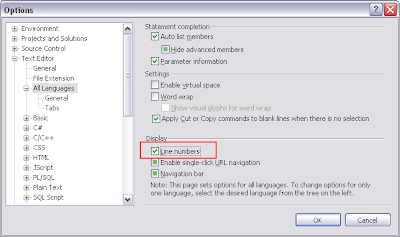
Well, after working with Visual Studio 2008 on a few projects, I have realized that I did not have the line numbers showing up on the left side of the editor. To make them appear, go to Tools > Options > Text Editor > All Languages and make sure that the Line Numbers option is checked.

Tuesday, February 07, 2012
System requirements for 2013 products
I heard from a colleague today that the 2013 version of the Revit family of products will require SERIOUS computer power. If this is the case (we should find out in April), then AutoCAD-based products might require stronger, faster, bigger computers to run as well. I noticed a huge drop in performance on my laptop between AutoCAD 2011 and 2012. My desktop systems run AutoCAD 2012 and AutoCAD Map 3D 2012 fairly well even if they are 2 and 4 years old respectively.
Are Autodesk, Microsoft and other companies' product offerings getting too big and too demanding for the ROI (Return On Investment)? I am not in a production environment but if new hardware is needed to run these various packages, then budgeting for these needs will be very important during the migration period.
With the fall 2012 arrival of Windows 8, I suspect many companies will wait until the year 2013 and migrate to Windows 8 and Autodesk 2014 products and skip the 2013 products altogether.
Are Autodesk, Microsoft and other companies' product offerings getting too big and too demanding for the ROI (Return On Investment)? I am not in a production environment but if new hardware is needed to run these various packages, then budgeting for these needs will be very important during the migration period.
With the fall 2012 arrival of Windows 8, I suspect many companies will wait until the year 2013 and migrate to Windows 8 and Autodesk 2014 products and skip the 2013 products altogether.
Monday, January 09, 2012
Line numbers in Visual Studio project
Hello again,
Well, it's a new year and it's back to work time. Today's post is a small one. I needed to know the current line number in a C# AutoCAD Plug-In project. In Visual Studio, to activate the status bar, go to Tools -> Options -> Environment -> General and check the Show Status Bar option (as shown):
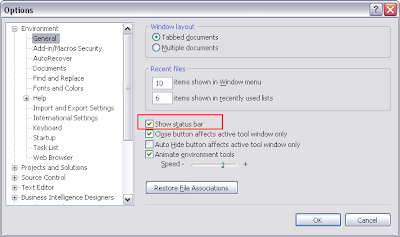
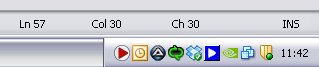
Now the line and column position of the cursor is shown. Pretty handy when looking for errors and warnings!
Well, it's a new year and it's back to work time. Today's post is a small one. I needed to know the current line number in a C# AutoCAD Plug-In project. In Visual Studio, to activate the status bar, go to Tools -> Options -> Environment -> General and check the Show Status Bar option (as shown):

Now the line and column position of the cursor is shown. Pretty handy when looking for errors and warnings!

Friday, November 18, 2011
Uninstalling FLEXnet Manager
I have been working with Flexera's FLEXnet Manager for a while now. It is the workable version of SAM-Report Lite that you can install to analyze your network license usage. Installing is quite the chore but not impossible if you have an experienced IT department. Uninstalling it is not so easy of you have a 64-bit server.
On a 64-bit server (ex. Windows Server 2008), there is no official uninstall tool so it has to be done manually if you intend on keeping the server. Here's what I did to remove it from our lab server (the production version is staying for obvious reasons...).
1- Stop all related services from the management console.
2- Backup all related folders.
3- Open a command prompt with administrative privileges (Windows Server 2008 only).
4- Navigate to the folder that contains the FLEXNET.BAT file for the Admin, Reporting or Agent module.
5- Type the following command: flexnet service uninstall
6- Repeat step 5 for each module.
7- Use an uninstaller such as RevoUninstaller to uninstall each program module (a WIN64 error will appear for Admin and Reporting. Just skip it).
There you go. Worked for me. A little bit of a pain but not impossible. Good luck!
On a 64-bit server (ex. Windows Server 2008), there is no official uninstall tool so it has to be done manually if you intend on keeping the server. Here's what I did to remove it from our lab server (the production version is staying for obvious reasons...).
1- Stop all related services from the management console.
2- Backup all related folders.
3- Open a command prompt with administrative privileges (Windows Server 2008 only).
4- Navigate to the folder that contains the FLEXNET.BAT file for the Admin, Reporting or Agent module.
5- Type the following command: flexnet service uninstall
6- Repeat step 5 for each module.
7- Use an uninstaller such as RevoUninstaller to uninstall each program module (a WIN64 error will appear for Admin and Reporting. Just skip it).
There you go. Worked for me. A little bit of a pain but not impossible. Good luck!
Wednesday, November 02, 2011
LISP programming primer
I received a request from a client asking me to look at a LISP program he wrote that did not work correctly. I said yes and received the following code:
(COMMAND "osnap" "End,Mid,Cen,Node,Quad,Int,Ins,Perp")
LISP and all programming languages require a certain syntax when writing code for it to work. The above code did not conform to the needed syntax. Here is the corrected version:
(defun C:MYOS (/)
(setvar "OSMODE" 255)
; CODE FOR END, MID, CEN, NOD, QUAD,
; INT, INS, PERP OSNAPS
)
The first rule of LISP, everything HAS to be in parentheses. The second rule is that each set of parentheses gets evaluated individually. The third rule is that all LISP functions must be defined with a DEFUN command.
The C:MYOS defines a function that can be launched from the command line by typing MYOS and then ENTER. The (/) indicates that no arguments or local variables are being used. The SETVAR command is used to modify AutoCAD variables like OSMODE which is responsible for the active OSNAPS in your AutoCAD session. Each combination of OSNAPS will have a unique code. The AutoCAD documentation explains this variable very clearly. The text following the semicolon is a LISP comment which is ignored by AutoCAD when running the function.
An alternative to this simple little function is to script the operation is a file like MYOS.SCR. In Notepad, type the following text with NO spaces at the end of each line and press ENTER at the end of each line as well.

Scripting is handy for some operations but can be tricky at times. The underscore + dash before the OSNAP command are used to internationalize the script (any non-english AutoCAD will recognize it) and to deactivate the dialog box so that the answers are sent as plain text.
In both scenarios, write your code in Notepad and then drag and drop the file into your AutoCAD session to load it. The LISP function must be launched on the command line but the script will run automatically if no command is already active.
Hours and hours of fun are possible when you start dipping into automation. Not for the faint of heart!!!
Happy coding!
(COMMAND "osnap" "End,Mid,Cen,Node,Quad,Int,Ins,Perp")
LISP and all programming languages require a certain syntax when writing code for it to work. The above code did not conform to the needed syntax. Here is the corrected version:
(defun C:MYOS (/)
(setvar "OSMODE" 255)
; CODE FOR END, MID, CEN, NOD, QUAD,
; INT, INS, PERP OSNAPS
)
The first rule of LISP, everything HAS to be in parentheses. The second rule is that each set of parentheses gets evaluated individually. The third rule is that all LISP functions must be defined with a DEFUN command.
The C:MYOS defines a function that can be launched from the command line by typing MYOS and then ENTER. The (/) indicates that no arguments or local variables are being used. The SETVAR command is used to modify AutoCAD variables like OSMODE which is responsible for the active OSNAPS in your AutoCAD session. Each combination of OSNAPS will have a unique code. The AutoCAD documentation explains this variable very clearly. The text following the semicolon is a LISP comment which is ignored by AutoCAD when running the function.
An alternative to this simple little function is to script the operation is a file like MYOS.SCR. In Notepad, type the following text with NO spaces at the end of each line and press ENTER at the end of each line as well.
Scripting is handy for some operations but can be tricky at times. The underscore + dash before the OSNAP command are used to internationalize the script (any non-english AutoCAD will recognize it) and to deactivate the dialog box so that the answers are sent as plain text.
In both scenarios, write your code in Notepad and then drag and drop the file into your AutoCAD session to load it. The LISP function must be launched on the command line but the script will run automatically if no command is already active.
Hours and hours of fun are possible when you start dipping into automation. Not for the faint of heart!!!
Happy coding!
Wednesday, June 01, 2011
AutoCAD 2011 Updates
With my preparations for my next AutoCAD class, I realized that my copy of AutoCAD 2011 was not updated. Currently, Update 2 is the most recent patch. To install it, you must install Update 1.1 as a prerequisite. A nice change from previous versions, you do NOT need your installation media to install the patches. Go to http://support.autodesk.com to download them.
Avec mes préparations pour mon prochain cours d'AutoCAD, j'ai découvert que ma copie d'AutoCAD 2011 n'était pas à jour. Update 2 est le correctif le plus récent. Pour l'installer, il y a un prérequis que l'Update 1.1 soit installé au préalable sur votre poste. Il est bien de noter que vous n'avez PAS besoin de votre média d'installation pour appliquer les 2 correctifs. Visitez le http://support.autodesk.com pour les obtenir.
Avec mes préparations pour mon prochain cours d'AutoCAD, j'ai découvert que ma copie d'AutoCAD 2011 n'était pas à jour. Update 2 est le correctif le plus récent. Pour l'installer, il y a un prérequis que l'Update 1.1 soit installé au préalable sur votre poste. Il est bien de noter que vous n'avez PAS besoin de votre média d'installation pour appliquer les 2 correctifs. Visitez le http://support.autodesk.com pour les obtenir.
Projects update
Well, it was a busy month of May. My compost bin was fixed by the city. The clover I planted in the backyard is growing nicely. I planted my vegetables and herbs for the summer and I have been giving some AutoCAD courses to a few clients.
Preparing for the courses has soaked up a lot of my free time. My favorite features from the last 3 versions are:
Preparing for the courses has soaked up a lot of my free time. My favorite features from the last 3 versions are:
- Parameters
- Arrays
- Splines and Polyline grips
Tuesday, May 10, 2011
Project 5: Replacing my compost bin - Follow-up
Well, I did get a response from the city about the bin. They will send someone to repair it. Hopefully, it will be done soon. TBC.
Project 2: AutoCAD 2012 Review
Tonight, I am digging into what has changed in AutoCAD, notably since the 2009 version since that is the version I use on a daily basis. Two things of note:

C:\Users\\appdata\roaming\autodesk\autocad 2012 - english\r18.2\enu\support
A nice improvement is the ability to add multiple support paths for printer files. Many users have CTB files in different locations and instead of adding shortcuts in each folder, a new search path can be added. This should also help when using ETransmit.


The default support path is as follows on a Windows Vista or Windows 7 computer:
C:\Users\
A nice improvement is the ability to add multiple support paths for printer files. Many users have CTB files in different locations and instead of adding shortcuts in each folder, a new search path can be added. This should also help when using ETransmit.

Subscribe to:
Posts (Atom)
